NOVA Ink
Writing help in Chrome and Edge
US$7.99a month
- Fix as you type
- Highlight to rewrite, summarize or translate
- Draft replies in Gmail
- Formula fixes in Google Sheets
- 300 AI actions a month
NOVA Ink by NOVA
NOVA Ink is an extension for Chrome and Edge. It fixes typos as you type, drafts Gmail replies, and rewrites, translates or summarizes any text you highlight.
7-day trial with 10 AI actions a day. No card needed. Then US$7.99 a month.
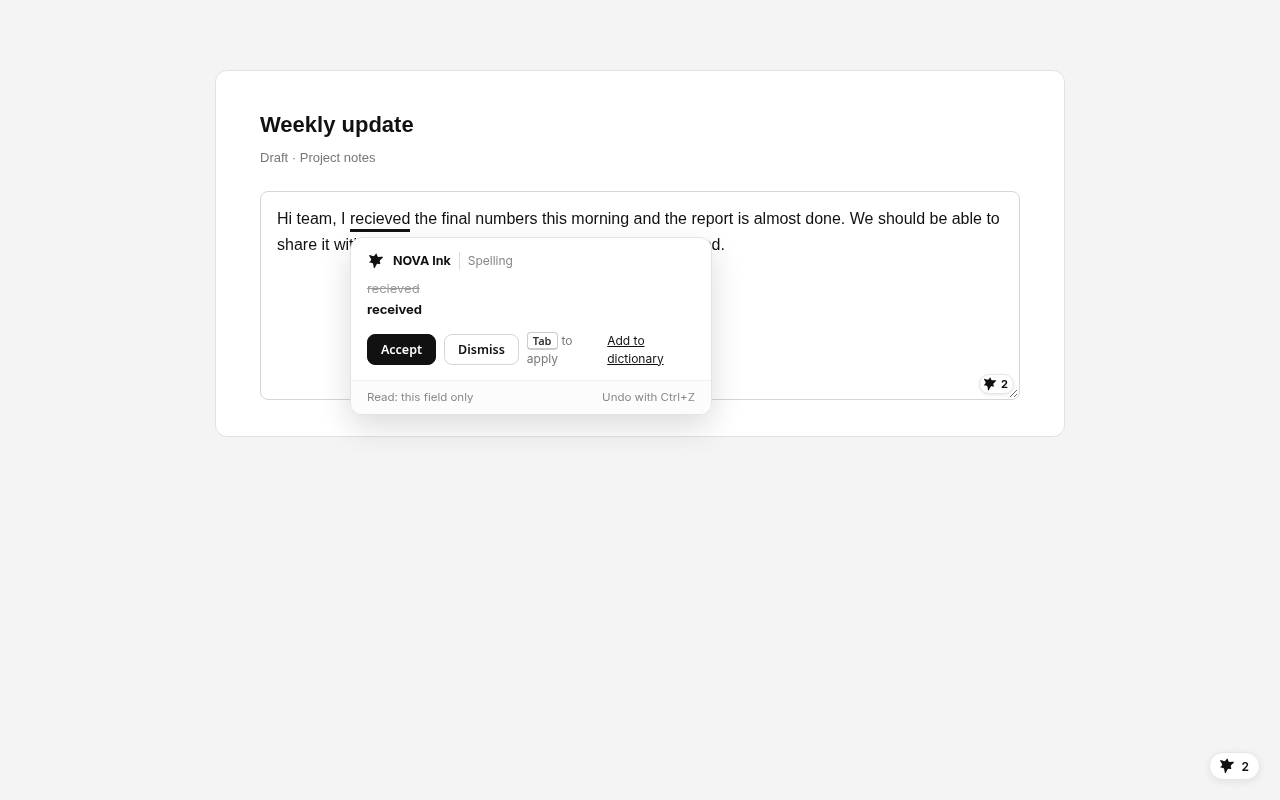
A sample. In your browser, NOVA Ink works in the box you are typing in.
NOVA Ink checks your writing as you type in Chrome and Edge: in email, forms, chat boxes and most text boxes on the web, with spelling checks inside Google Docs too. Mistakes get a quiet underline. Click it or press Tab to fix, and Ctrl+Z undoes it. Fixes change your wording, never your meaning, names, numbers or dates.
Spelling is checked on your device. After you pause, the sentence you are typing is checked for grammar.
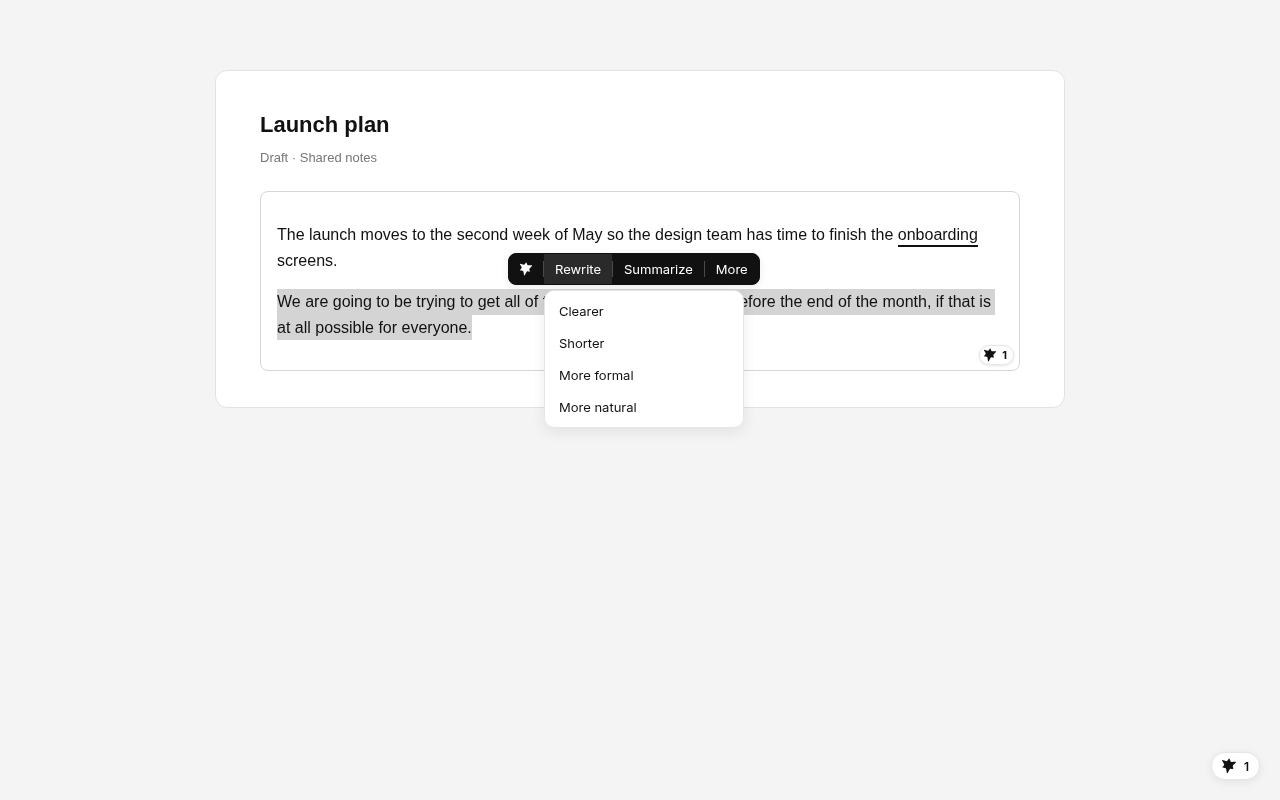
Make text clearer, shorter, more formal or more natural. Summarize it, translate it into 12 languages, or ask about it.
See your tone in one word and change it with one tap: friendly, confident or direct. Hints point out long sentences and filler.
Tap Draft reply, make it shorter, warmer or firmer, then press Insert. It never presses Send.
Replies in Gmail Google Sheets#N/A, #REF! and lookups that return the wrong row, explained and fixed in place.
Formulas in Sheets School and researchHighlight a claim to find published papers, then copy the citation in APA 7, MLA 9 or Chicago.
Find sources Any text boxA style score with the reasons, and a one-tap fix. A writing check, not an AI detector.
The natural checkInstall NOVA Ink from the Chrome Web Store. It works in Chrome and Edge.
Use your NOVA account, the same one as Mini NOVA, or create one.
Type anywhere. NOVA Ink underlines slips and waits for you to choose.
Spelling, the natural check, tone and Sheets formula checks run on your device. Text is sent only to give you a result you asked for, or the sentence you are typing while fix as you type is on. Our servers don't store your text, and it is never used to train AI models.
NOVA Ink is always off on banking, checkout, tax, health and sign-in pages, and never reads password or payment fields. Turn it off on any site from its menu.
Start with a 7-day trial. No card needed.
Writing help in Chrome and Edge
US$7.99a month
Best value
Both apps on one account
US$17.99a month
For teams
US$20per seat a month
Prices in US dollars. Paid yearly: NOVA Ink US$71.88, Mini NOVA + Ink US$179.90, Business US$192 per seat. 7-day trial with 10 AI actions a day. No card needed. NOVA Ink plans include 300 AI actions a month and 30 grammar checks a day, with fair use. Plans renew until you cancel. A Mini NOVA Basic, Plus or Pro plan does not include NOVA Ink.
Price, fixes as you type, Gmail drafts and privacy, side by side.
Read the comparison CompareA paraphrasing toolkit, or help inside the box you are typing in.
Read the comparison CompareMany languages and apps, or English help in Chrome with Gmail drafts.
Read the comparison GuideFive writing assistants compared on price and what they do.
Read the guideNOVA Ink is a browser extension from NOVA for Chrome and Edge. It fixes typos as you type, drafts Gmail replies, and rewrites, translates or summarizes text you highlight.
US$7.99 a month or US$71.88 a year, after a 7-day trial with 10 AI actions a day and no card needed. Mini NOVA and NOVA Ink together are US$17.99 a month.
Yes, for spelling. Mistakes are underlined inside Google Docs with no setup, and nothing leaves your device until you accept a fix or pick an action.
No. It drafts a reply for you to check, and you press Insert and Send yourself. It never presses Send or submits a form.
No. It never reads password or payment fields, and it is always off on banking, checkout, tax, health and sign-in pages.
No. It is a writing style check that runs on your device. It shows why text sounds stiff, like repeated stock phrases, and can't predict what other tools will say.
It checks writing in English and can translate highlighted text into 12 languages.
No. NOVA Ink works on its own. It uses the same NOVA account as Mini NOVA, so one sign-in covers both if you have both.
7-day trial with 10 AI actions a day. No card needed.