Draft Gmail replies from the thread
Tap Draft reply in an empty reply box. NOVA Ink writes a draft from the conversation, in the tone you pick. You check it and press Send.
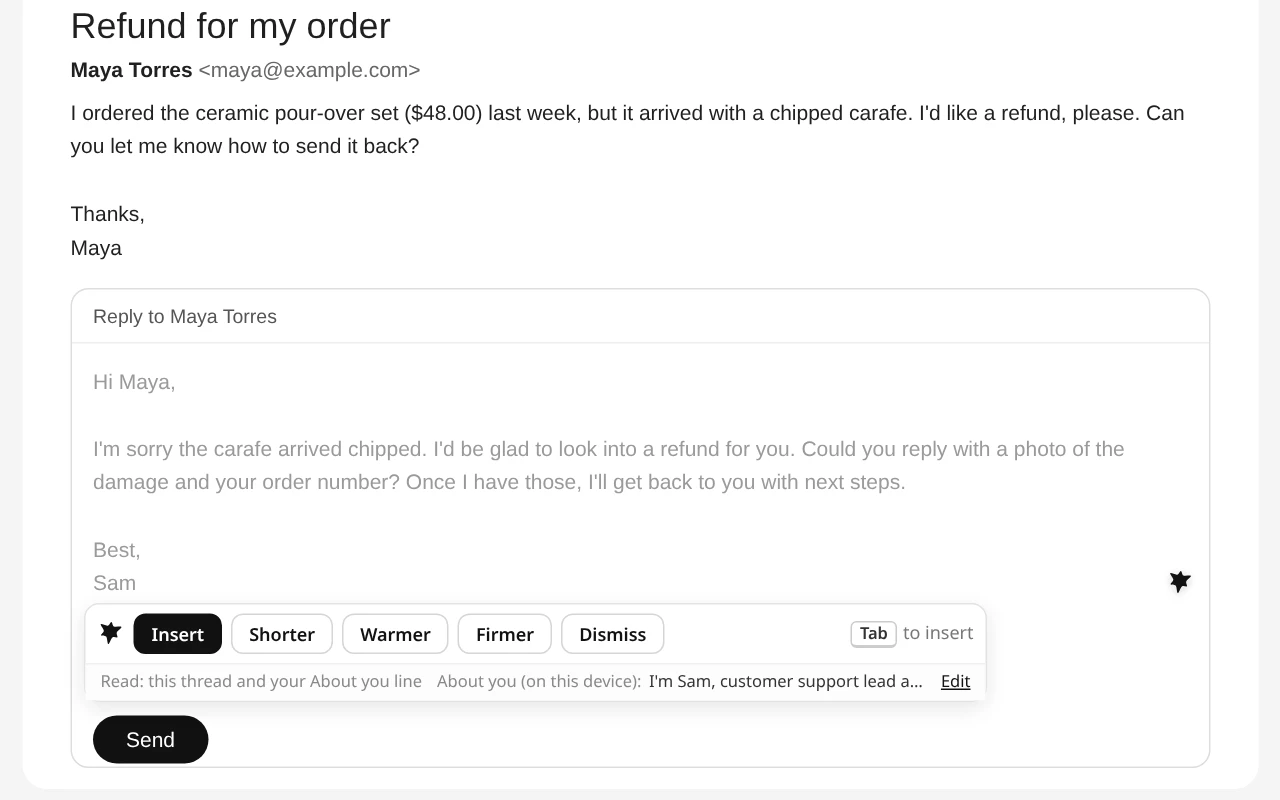
How Draft reply works
When you open an empty reply box in Gmail, NOVA Ink can draft a reply from the last 3 messages in the thread. The draft appears as gray preview text. Make it Shorter, Warmer or Firmer, then press Insert to put it in the box. NOVA Ink never presses Send for you.
From the real thread
The draft answers what was actually said, using the last 3 messages, not a generic template.
In your tone
Shorter, Warmer or Firmer with one tap. Add an About you line in Settings, such as your name and role, so drafts sound like you.
Check before Send
Before your email goes out, NOVA Ink flags issues so you can fix them first.
Reply in five steps
Open the email
Open the message you want to answer in Gmail.
Click Reply
Leave the reply box empty. NOVA Ink shows Draft reply.
Tap Draft reply
A draft appears in gray, written from the thread.
Adjust it
Tap Shorter, Warmer or Firmer until it reads right.
Insert and send
Press Insert, read it, edit anything you like, and press Send yourself.
What NOVA Ink reads
Only when you tap Draft reply: the last 3 messages in that thread, with quoted history removed and email addresses masked, plus your About you line if you set one. It doesn't read the rest of your inbox. Our servers don't store the text, and it is never used to train AI models.
New to writing replies quickly? Read how to reply to emails faster in Gmail.
Questions
Does NOVA Ink read my whole inbox?
No. It reads only the last 3 messages of the thread you are replying to, and only when you tap Draft reply.
Will it send emails for me?
No. You press Insert to use the draft, and you press Send yourself. NOVA Ink never sends anything.
Can I change the tone?
Yes. Tap Shorter, Warmer or Firmer, or edit the draft yourself after you insert it.
Does Draft reply work in Outlook?
Draft reply is built for Gmail. Fix as you type and highlight to rewrite work in most text boxes in Chrome and Edge.
Does a draft use my AI actions?
Yes. Each draft is an AI result you asked for, so it uses your plan's AI actions.
More from NOVA Ink
Reply in your own words, faster.
7-day trial with 10 AI actions a day. No card needed.